New from SuperchargeBrowser

Focus on whatmatters most.

Block the sites that pull you away. Set your own rules and keep your attention where it belongs.

Free to use · No account needed · Runs locally · Data stays on device

NorthlightScrollfeed northlight.examplescrollfeed.example
NorthlightTravelIdeasFoodDesignSubscribe
The slow way north: a week of night trains
SuperchargeFocus
This site Focus Activity
N northlight.exampleUses global appearance Show original
Appearance
This site Use globalLightDark
All websitesLight on all websitesDark on all websites LightAutoDark
Night tint
Start a focus session

Your selected focus rules apply during the session.

25minutes 50minutes …Custom
Session active

Focus until

10:25 AM

Your focus rules apply.

Take a break End session
Global theme saved.
SuperchargeFocus
scrollfeed.example

scrollfeed.example is blocked while you focus.

25 min left in this session.

Go backOpen Focus
Continue anyway
  • Modes Gentle or strict
  • Privacy History stays on your device
  • Shortcut Alt+Shift+B

SuperchargeFocus

Panel opened here

Focus openedon this page.

Your browser does not let extensions change its own pages, its extension store or PDFs, so Focus opened its panel here instead.

See features
  • Access Focus icon in toolbar
  • Shortcut AltShiftB
  • Works on Regular web pages only

Daily allowances

A daily budget, not a ban.

Give a site 30 minutes a day and keep them. Focus counts the minutes you actually spend there, shows what is left, and closes the site for the day once they are used.

  • Counts attention, not open tabs. Only the active tab counts, and counting stops after two idle minutes and while your screen is locked.
  • Resets at midnight. Each local day starts at zero.
  • Whole sites. One allowance covers the site and its subdomains.

More on daily time limits.

  • Session tiles 25 · 50 Or any length up to 1440 minutes
  • Focus rules 100 Block list or allow list
  • Break minutes 5 · 15 Every restriction pauses
  • Accounts 0 No sign-in, no analytics

Choose your level of support

Pick the mode that fits your needs. Both help you stay focused.

Gentle pause

  • A calm pause screen appears
  • You can continue on purpose
  • It helps you notice the habit

Strict block

  • Firm stop with no Continue button
  • Lasts until the focus session ends
  • For a daily allowance, lasts until next day

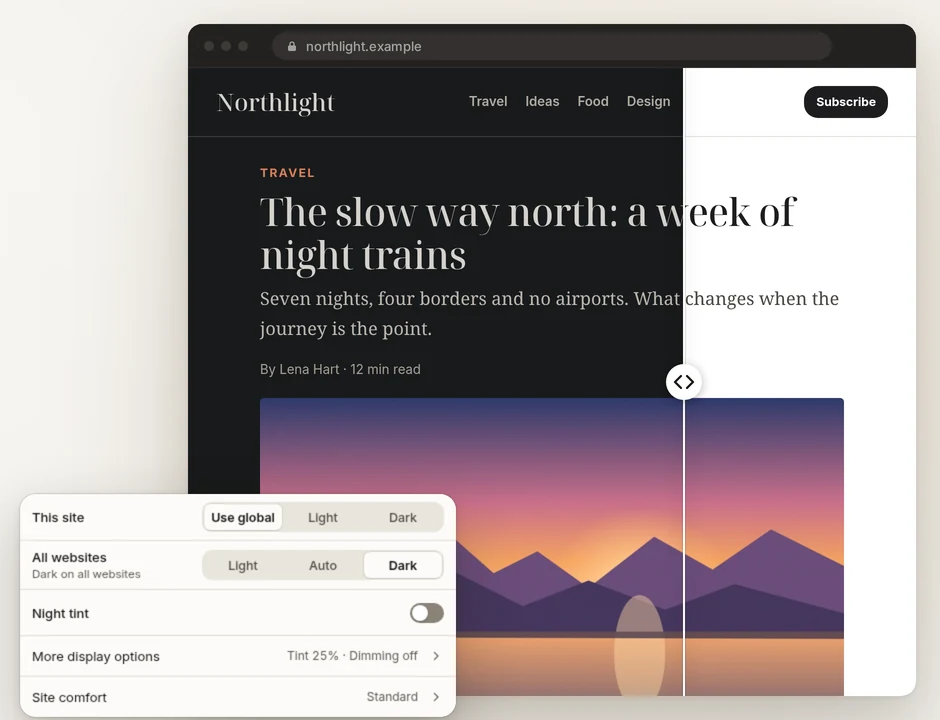
Dark mode

Dark pages that still look like the site.

Pick Light, Auto or Dark for every website, then give any site its own theme. Focus asks a site for its own dark theme first and builds one only when the site has none.

  • Per-site themes stay put when you change the global setting.
  • Keep native dark pages and Protect photos and video are on by default.
  • Show original turns theme, tint and dimming off on one site.

More on dark mode for websites.

The SuperchargeFocus display panel set to Dark on all websites, beside an article page shown half in its own dark theme and half in its original light theme.

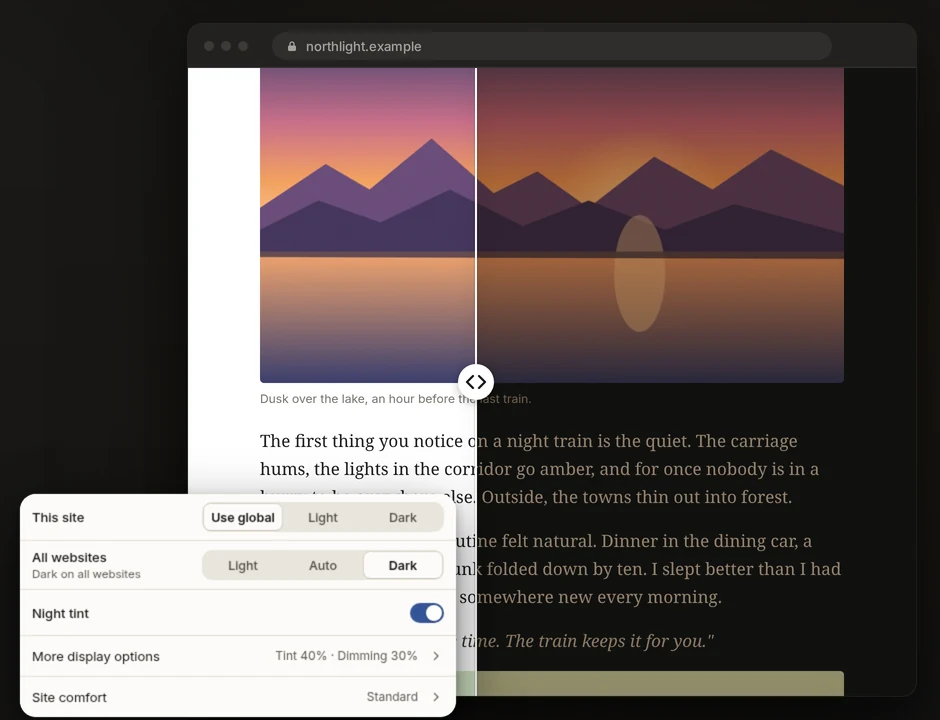
Night tint

Warmer, dimmer pages after sunset.

A warm overlay and a brightness slider for web pages. Set fixed hours or sunset to sunrise, worked out on your device from a location you type in.

  • Two sliders: tint strength, and Reduce page brightness up to 80%.
  • Per site: skip the tint, skip the dimming, or keep both off photos and video.
  • Website content only. Browser tabs, toolbars and other apps are not changed.

More on night tint.

The SuperchargeFocus display panel with Night tint on at 40% and dimming at 30%, beside a dark article page with a warm tint on one half.

Make this page calmer

Keep the site. Lose the pull.

Hide the parts of a page that keep you scrolling. On YouTube, Watch intentionally hides Shorts, recommendations and comments, and pauses videos that start without a click. Each part has its own switch.

  • Pick any element and refine it with the arrow keys before you save.
  • Or type a request like hide comments. Every match is previewed first.
  • This site or this page. Hidden in your browser only, removable any time.

More on YouTube distractions and hiding page elements.

Everything in Focus 1.0

Focus time, daily limits, easier reading and calmer pages, in one extension for Chrome and Edge.

Focus

Start focus in one click.

25 or 50 minutes, or any length up to a day. Your rules hold until the timer ends.

  • Block or allow list. Block up to 100 sites, or allow only the ones you need.
  • Recurring focus. The weekdays and hours you choose, overnight too.
  • Gentle or strict. A five second pause, or no way through.
  • Breaks. 5 or 15 minutes with every rule paused.
  • Path exceptions. Keep one part of a blocked site open.
Limits

A daily budget, not a ban.

Give a site its minutes for the day. A meter shows what is left.

  • Counts attention. Only the active tab. Idle time and a locked screen do not count.
  • Background audio. Off by default. Count audible tabs too if you want.

Appearance

Every site, your way.

Light, Auto or Dark everywhere, with its own choice for any site.

  • Night tint. A warm overlay, and dimming up to 80%.
  • Schedules. Fixed hours, or sunset to sunrise.
  • Site comfort. Larger text or higher contrast on any site.

Page

Calmer pages.

Hide Shorts, recommendations and comments on YouTube, each with its own switch.

  • Element picker. Point at any part of a page and hide it.
  • Typed requests. Type what to hide and preview every match.

Privacy

No account. No analytics.

Rules, counters and settings stay in your browser.

  • Activity history. Off by default. Keep 7, 30 or 90 days.
  • Setup export. Move your setup in one file, history left out.

Your data stays in your browser

Focus has no account and no analytics. Rules, counters and settings live in your browser’s local extension storage.

  • Activity history is off by default. Turn it on and choose what it keeps: addresses, page titles, page text. Passwords, form fields and typed text are never recorded.
  • You set the limits. Keep 7, 30 or 90 days, search it, pause it for 24 hours, exclude sites, or delete it all with Delete Activity data.
  • Move your setup. Export rules and settings to one file and import it on another computer, with a preview, Replace setup and Undo last import. History is never in the file, though the file does list the sites in your rules.

Three steps to start

Set up Focus in the panel with three simple choices.

  1. What pulls you away?

    Pick the sites that pull you away. Suggestions include YouTube, Reddit, X, Instagram, Facebook, and TikTok.

  2. What should happen?

    Decide what happens on those sites: a daily allowance, or a block during focus sessions only.

  3. Look and feel

    Choose how pages look.

You can skip setup and keep the defaults.

How to open Focus

Access the Focus panel from anywhere in your browser.

  • Click the Focus icon in your browser toolbar on any regular web page. Not pinned yet? Find it under the puzzle-piece Extensions button.
  • AltShiftB Use the keyboard shortcut to open and close the panel quickly.
  • On your browser's own pages, its extension store and PDFs, the panel opens on this page instead.

Questions

Is SuperchargeFocus free?
Yes. It is completely free to use. There is no cost and no subscription required.
Does Focus send my browsing data anywhere?
No. Activity history is optional and off by default. If you turn it on, the data is stored only on your device. Nothing is sent to our servers.
Why can't Focus run on browser pages, the extension store or PDFs?
Chrome and Edge do not allow extensions to run on their own internal pages, their extension stores, or PDF files. For security reasons, these areas are protected. Focus opens its panel on this page instead.
Can I still visit a blocked site?
In Gentle pause mode, you see a pause screen but can choose to continue. In Strict block mode, the block screen has no Continue button. You can still take an available break, end a focus session, pause a scheduled occurrence or change your Focus settings. Daily allowances also reset every day, giving you fresh minutes each morning.
When will it be on the Chrome Web Store?
It is coming soon. We do not have a specific date yet. This page will link directly to the store listing once it is available.
Which browsers does SuperchargeFocus run on?
Chrome and Microsoft Edge. The interface is in English.
Can I limit a site instead of blocking it?
Yes. Give it a daily allowance from 1 to 1440 minutes. Time counts only while the site is your active tab, stops after two idle minutes and while the screen is locked, and resets at local midnight.
Will dark mode break sites that already have a dark theme?
No. Focus asks the site for its own dark theme first, and Keep native dark pages is on by default, so a page that is already dark is left as it is. Show original turns everything off on a site in one click.
Can I move my setup to another computer?
Yes. Export saves your rules and settings to one file, and Import shows a preview before Replace setup. Undo last import restores what you had. Activity history is never included.

Status

Not quite readyfor the store.

Focus is not on the Chrome Web Store yet. This page will link to it when it is available.

Coming soon to the Chrome Web Store Browse other extensions