Advanced Script Control & Throttling for Chrome
Advanced Script Control &
Throttling for Chrome
Advanced Script Control &
Throttling for Chrome
Reduce Chrome CPU usage and extend laptop battery life. Intelligently throttle background JavaScript and block unoptimized third-party scripts without breaking site functionality
Reduce Chrome CPU usage and extend laptop battery life. Intelligently throttle background JavaScript and block unoptimized third-party scripts without breaking site functionality
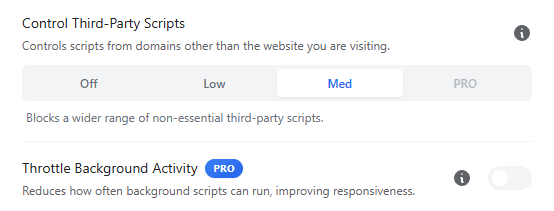
The Architecture of Execution Control
Modern web applications execute complex JavaScript bundles continuously, even when a tab is hidden. This background processing creates resource contention, forcing your CPU to maintain high clock speeds unnecessarily.
SuperchargeBrowser acts as a resource governor. It utilizes native browser APIs to intercept and manage how these scripts execute on your local machine.
Reduction of Payload: By blocking non-essential third-party domains before they load.
Execution Throttling: By limiting the frequency of JavaScript timers in background tabs.
The Architecture of Execution Control
Modern web applications execute complex JavaScript bundles continuously, even when a tab is hidden. This background processing creates resource contention, forcing your CPU to maintain high clock speeds unnecessarily.
SuperchargeBrowser acts as a resource governor. It utilizes native browser APIs to intercept and manage how these scripts execute on your local machine.
Reduction of Payload: By blocking non-essential third-party domains before they load.
Execution Throttling: By limiting the frequency of JavaScript timers in background tabs.
Intelligent Resource Orchestration
We do not simply break pages. We orchestrate them. Our Background Throttling Feature ensures that your active tasks receive priority while background processes are put into a low-power state.
SuperchargeBrowser automatically hides:
Third-Party Script Control:
Regain control over external code. SuperchargeBrowser identifies and blocks scripts from domains that do not originate from the website you are visiting. This neutralizes heavy tracking pixels, crypto-miners, and unoptimized social widgets.
Adaptive Background Throttling:
When you switch away from a tab, SuperchargeBrowser reduces its script execution rate. This drastically lowers CPU wake-ups, allowing your processor to idle effectively and extending laptop battery life.
Intelligent Resource Orchestration
We do not simply break pages. We orchestrate them. Our Background Throttling Feature ensures that your active tasks receive priority while background processes are put into a low-power state.
SuperchargeBrowser automatically hides:
Third-Party Script Control:
Regain control over external code. SuperchargeBrowser identifies and blocks scripts from domains that do not originate from the website you are visiting. This neutralizes heavy tracking pixels, crypto-miners, and unoptimized social widgets.
Adaptive Background Throttling:
When you switch away from a tab, SuperchargeBrowser reduces its script execution rate. This drastically lowers CPU wake-ups, allowing your processor to idle effectively and extending laptop battery life.
CPU Efficiency Comparison:
Standard Chrome:
❌: Background tabs compete for CPU cycles 60 times per second. High thermal output.
Aggressive Script Blockers:
❌: Indiscriminately breaks functionality (NoScript). Requires constant configuration.
SuperchargeBrowser:
✅: Context-aware throttling. Detects audio & video streams to prevent interruptions while aggressively optimizing silent background tabs.
CPU Efficiency Comparison:
Standard Chrome:
❌: Background tabs compete for CPU cycles 60 times per second. High thermal output.
Aggressive Script Blockers:
❌: Indiscriminately breaks functionality (NoScript). Requires constant configuration.
SuperchargeBrowser:
✅: Context-aware throttling. Detects audio & video streams to prevent interruptions while aggressively optimizing silent background tabs.
Script Throttling FAQs
Q: How does this affect battery life?
A: By reducing the CPU load from background tabs, users on laptops (MacBook, Windows Surface, etc.) typically see a 20-30% improvement in unplugged runtime during heavy browsing sessions.
Q: Will this break dynamic websites?
A: Our algorithms are designed to be non-intrusive. However, our Granular Site Controls (Whitelisting) allow you to instantly whitelist complex web apps (like Figma or Sheets) to ensure they have full access to system resources when needed.
Q: Is this different from Ad Blocking?
A: Yes. Ad Blocking stops the download of images and banners. Script Control manages the execution of the code. Together, they provide a layered defense against browser sluggishness.
Q: How does this affect battery life?
A: By reducing the CPU load from background tabs, users on laptops (MacBook, Windows Surface, etc.) typically see a 20-30% improvement in unplugged runtime during heavy browsing sessions.
Q: Will this break dynamic websites?
A: Our algorithms are designed to be non-intrusive. However, our Granular Site Controls allow you to instantly whitelist complex web apps (like Figma or Sheets) to ensure they have full access to system resources when needed.
Q: Is this different from Ad Blocking?
A: Yes. Ad Blocking stops the download of images and banners. Script Control manages the execution of the code. Together, they provide a layered defense against browser sluggishness.
Script Throttling FAQs
Q: How does this affect battery life?
A: By reducing the CPU load from background tabs, users on laptops (MacBook, Windows Surface, etc.) typically see a 20-30% improvement in unplugged runtime during heavy browsing sessions.
Q: Will this break dynamic websites?
A: Our algorithms are designed to be non-intrusive. However, our Granular Site Controls (Whitelisting) allow you to instantly whitelist complex web apps (like Figma or Sheets) to ensure they have full access to system resources when needed.
Q: Is this different from Ad Blocking?
A: Yes. Ad Blocking stops the download of images and banners. Script Control manages the execution of the code. Together, they provide a layered defense against browser sluggishness.
Q: How does this affect battery life?
A: By reducing the CPU load from background tabs, users on laptops (MacBook, Windows Surface, etc.) typically see a 20-30% improvement in unplugged runtime during heavy browsing sessions.
Q: Will this break dynamic websites?
A: Our algorithms are designed to be non-intrusive. However, our Granular Site Controls allow you to instantly whitelist complex web apps (like Figma or Sheets) to ensure they have full access to system resources when needed.
Q: Is this different from Ad Blocking?
A: Yes. Ad Blocking stops the download of images and banners. Script Control manages the execution of the code. Together, they provide a layered defense against browser sluggishness.
Complete Optimization Toolkit:
Intelligent Tab Suspension:
Reduce Chrome's memory footprint by suspending idle tabs locally.
Explore Memory Management
Ad, Tracker & Annoyance Blocking:
Eliminate network lag by blocking ads and trackers before they load.
Ad & Tracker Blocking:
Eliminate network lag by blocking ads and trackers before they load.
View Blocking Architecture
View Blocking Architecture
Complete Optimization Toolkit:
Intelligent Tab Suspension:
Reduce Chrome's memory footprint by suspending idle tabs locally.
Explore Memory Management
Ad, Tracker & Annoyance Blocking:
Eliminate network lag by blocking ads and trackers before they load.
View Blocking Architecture
Related Articles
Keep ChatGPT Alive: Fix Chrome Network Errors in Background Tabs (2026)
Read Analysis
Fix 'Service Worker' High CPU Usage in Chrome
Read Analysis
View Full Library
Related Articles
Keep ChatGPT Alive: Fix Chrome Network Errors in Background Tabs (2026)
Read Analysis
Fix YouTube Stuttering on High-End PCs (RTX 5080/5090)
Read Analysis
Fixing Chrome Memory Leaks in macOS Tahoe (2026 Guide)
Read Analysis
Fix 'Service Worker' High CPU Usage in Chrome
Read Analysis
Disable 'Efficiency Mode' for Specific Tabs (The Whitelist Trick)
Read Analysis
Fix Chrome 'Checkerboard' Glitch When Scrolling
Read Analysis
View Full Library